
Matchmaking Guide: How to Form a Party
★ 8 SHiFT Codes as of September 2025
☆ Black Market Location
★ Elemental Weakness Chart
☆ Legendary Weapons
★ Builds: Vex | Amon | Rafa | Harlowe
☆ How to Respec Skill Tree
Learn how matchmaking works and how to form a multiplayer party in Borderlands 4! Learn how to matchmake with randoms, party up with friends, and set session settings for multiplayer.
List of Contents
Matchmaking Guide
| Forming a Party with Friends | Matchmaking with Randoms |
Forming Parties with Friends
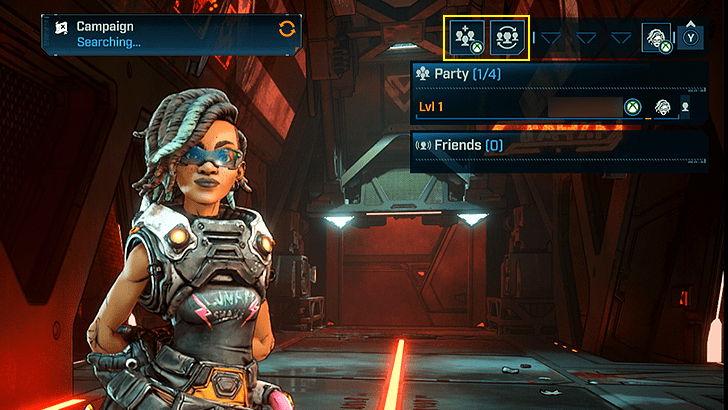
Parties can be done through the Invite or Matchmaking function at the top-right corner of the main menu. To invite from a Friends list or through search, select the group button with a plus (+) icon.
Depending on your platform, you can directly invite someone already from your friends list if they have the game, or search up a player's name directly.
Matchmaking with Randoms
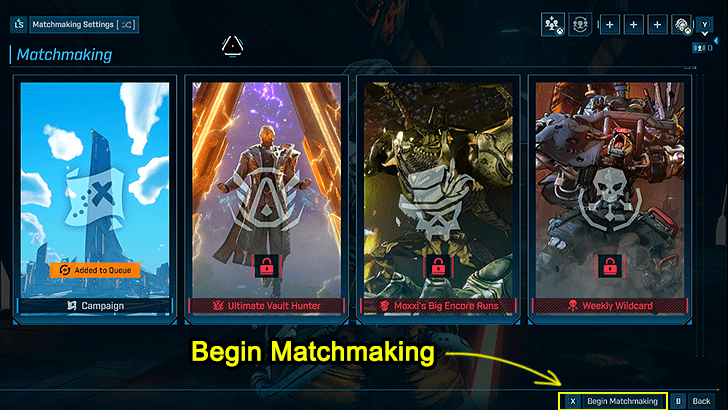
The corresponding input for Begin Matchmaking is found at the bottom-right.
If you are playing Solo but are looking to join up with a random group, you can simply use the standard Matchmaking option. Select a matchmaking mode to queue, then select Begin Matchmaking.
Note that matchmaking into another player's session will conform to the host's Session Settings. Session Settings determine the privacy and difficulty of the instance you join.
Crossplay and Session Settings
How to Enable or Disable Crossplay
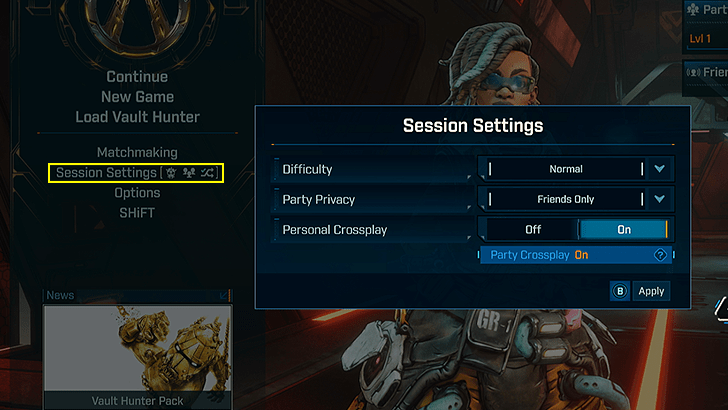
Note that Crossplay requires a SHiFT account.
Crossplay allows you to play with others online beyond your platform (ex. playing with PS5 or PC players if you are on Xbox). If you prefer not to, this option can be edited in the Session Settings menu.
The Session Settings also allow you to determine the Party Privacy and Difficulty of the instance as the host.
Crossplay Availability and How to Enable
SHiFT Account is Required for Crossplay
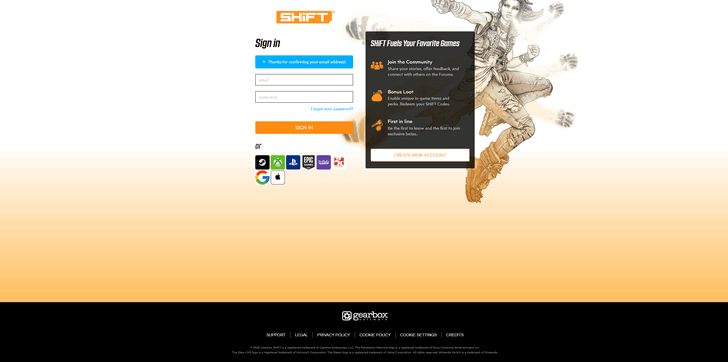
To enable Crossplay for Borderlands 4, you will need an official SHiFT Account. Head to Gearbox's SHiFT website and sign up for one if you haven't, then link it to your platform's account.
Having a SHiFT Account will also allow you to redeem SHiFT codes. These redemption codes can give useful rewards such as Golden Keys.
How to Create and Link SHiFT Account
Borderlands 4 Related Guides

Beginner's Guide to Borderlands 4: Tips and Tricks
Tips and Tricks Guides
Comment



Author
Matchmaking Guide: How to Form a Party

Rankings
- We could not find the message board you were looking for.
Gaming News




Popular Games

Genshin Impact Walkthrough & Guides Wiki
Hollow Knight: Silksong Walkthrough & Guides Wiki
Umamusume: Pretty Derby Walkthrough & Guides Wiki
Borderlands 4 Walkthrough & Guides Wiki
Wuthering Waves Walkthrough & Guides Wiki
Honkai: Star Rail Walkthrough & Guides Wiki
Pokemon TCG Pocket (PTCGP) Strategies & Guides Wiki
Pokemon Scarlet and Violet (SV) Walkthrough & Guides Wiki
Zenless Zone Zero Walkthrough & Guides Wiki
Clair Obscur: Expedition 33 Walkthrough & Guides Wiki









Recommended Games
Fire Emblem Heroes (FEH) Walkthrough & Guides Wiki
Yu-Gi-Oh! Master Duel Walkthrough & Guides Wiki
Persona 3 Reload Walkthrough & Guides Wiki
Once Human Walkthrough & Guides Wiki
Black Myth: Wukong Walkthrough & Guides Wiki
The Legend of Zelda: Tears of the Kingdom Walkthrough & Guides Wiki
Super Smash Bros. Ultimate Walkthrough & Guides Wiki
Monster Hunter World Walkthrough & Guides Wiki
Diablo 4: Vessel of Hatred Walkthrough & Guides Wiki
Elden Ring Shadow of the Erdtree Walkthrough & Guides Wiki










All rights reserved
©2025 Gearbox Software. Published by 2K Games. Developed by Gearbox. Gearbox, Borderlands, and related logos are all trademarks of Gearbox Software, LLC. 2K and the 2K logo are trademarks of Take-Two Interactive Software, Inc. All other marks and trademarks are the property of their respective owners. All rights reserved.
The copyrights of videos of games used in our content and other intellectual property rights belong to the provider of the game.
The contents we provide on this site were created personally by members of the Game8 editorial department.
We refuse the right to reuse or repost content taken without our permission such as data or images to other sites.